Showing posts with label privacy. Show all posts

Thursday, April 29, 2021

Things to know about browser Cookies for online privacy

How do cookies work?
While working for the Netscape Lou Montulli invented the cookies in 1994 in order to monetize the website and make it a remunerative business. In the initial phase of its use, it was not widely known to the public, as it was used surreptitiously, and as a result it dtd not attract any adverse attention of the users. The website would not inform the user about the use of cookies and the user’s acceptance of cookies use was by default. Its grey was small and tentacles were few and short during the nascent phase. Aversion to cookies gradually rose only after the Financial Times (USA) published an article about cookies in 1996. Now there are elaborate laws for data protection to protect the net users from imperceptible presence of the cookies behind the screen. Now wwebsites have their cookies policy.

The website asks the user if the accept the cookies or not. If the user clicks, AGREE/ACCEPT ALL/YES, the browser will create the cookies. If you do not accept, you can visit the website in most of the cases but the website may not function as intended. The cookies will start tracking your net usage and store the data only you accept the cookies. The cookies would be stored on your PC (locally) or would be transmitted to the host server. When you visit the same website again, cookies will come into play. The cookies saved locally on the device or transferred from the server, will help you to fill up the form, login data, preference of language, etc and will also continue further to garner and accumulate more and more your tracking data while you are surfing the net. The “enriched” cookies will be stored locally on the device or on the host server, waiting to jump into your browser as and when you access the website next time. Quite smart and stealthy creature!

Types of cookies (Without classifying the cookies in a particular class):

[1] Necessary / Required Cookies
These are the basic cookies and without them the functioning of the website will be sub-optimal as they enable the basic functions of the website. This type of cookies cannot be disabled.
[2] Statistical / Analytics Cookies
These cookies are used for collecting data regarding the interaction of the user with the website and reporting the same anonymously. This helps to measure the activity of the users and improve the functionality of the website.
[3] Marketing Cookies
Primary purpose of these cookies is for marketing of products and services and depict relevant ad. They collect data on user behavior and interest and prepare User Profile and show ad/ link / banner as per the profile. Apart from marketing intelligence, various demographic, social and political profitable inferences can also be drawn.
[4] First-Party Cookies
Some cookies may pack more of a threat than others depending on where they come from. First-party cookies are used by the website user is using. These are less risky if the website is reputed one and have not been compromised.
[5] Third-Party Cookies
Irrespective of clicking by the user, the ad / link / banner on the website generate the cookies which are called Third-party cookies. They are more shrewd and risky. If there are, say 5 cookies on the website, 5 cookies will be generated even if the user does not click any of them. They help the advertisers or Analysts track netizens, browsing data across the web on any sites that display their ads.
[6] Zombie cookies
These cookies are bit pervert and would get generated without users’ Acceptance. They are Third-party and stay permanently on users' computers. Like a phoenix bird, they would get regenerated even after deleting. They are also known as “flash cookies” and are extremely difficult to remove. These cookies can be deployed to prevent the certain users.
[7] Session cookies
These cookies are “ephemeral” in terms longevity and according they are also called 'temporary cookies'. They store the user’s data for a particular session of use of the website and on closure of the browser, they are deleted. They are used for shopping from online stores.
[8] Permanent cookies
They will be stored on the device even after the web site is has closed. They store login ID and passwords so that web users don't need to re-enter them on next visit of the website. They are required to be deleted after certain months as prescribed in the data protection laws of the respective country.
[9] Tracking Cookies

If you are an avid net user, you must have registered / subscribed for a particular interest with a particular organisation/website. While you are doing this, Tracking Cookies are generated. Next day you would find lots of unsolicited promotional marketing material in your email account from many organisations from nook and corner of the world. The data generated by Tracking Cookies are shared by other unintended organisations/websites also, for pre-arranged mutual gains or otherwise.

How to block cookies:
The cookies serve useful purposes but your personal data are vulnerable to misuse. So you might have some aversion to them. If that is the case, when you visit the website, you can decline the acceptance to all the cookies (Except Necessary) but the performance of the website will be sub-optimal. Or you can Accept only particular type of cookies. This type of functionality is available in all the popular browsers in Settings.

Removing / Deleting the Cookies:
Cookies can be removed but bear in mind that your interface with the website will not be so smooth in their absence. Though, it is very difficult to remain anonymous / incognito while using the web, it is advisable to delete the Cookies to protect your privacy. This functionality is available in the browsers (generally under History > Clear Browsing Data).

Data security while on net:
It is pertinent to add here that use of public Wi-Fi is more susceptible to eavesdropping / hacking of personal data while use of VPN provides more cyber security to personal data. Likewise, TLS / HTTPS also provides more cyber security as the data is transmitted in encrypted format.

What are Cookies?
Putting the complex digital concept in simple words: Cookies are a small text file created by the browser to keep track of user’s language preference, login information, surfing behavior, usage of apps, shopping behavior, clicks on links/ads/banners, IP addresses, geographical location, currency, interests, due date of renewal of payable installed tools/software, etc while the user is surfing a website in order to use these data later, when the user visits the website again, in order to streamline the delivery of curated/tailored content, focused search results, relevant information and marketing ads, better feedback/communication, improved site performance/browsing satisfaction and, in most of the cases to manipulate the user’s data for a small pecuniary gains, for the website, through commission based on Pay Per Click.

Why were cookies invented?
Initially it was invented to keep track of the things an online shopper puts in the virtual shopping cart (say purchases) in a particular session of online shopping. Really a useful tool and true to their name, cookies were initially not despised by the net users. With the advent of IT, cookies were exploited to serve wider purposes.

It can store the data of the websites visited, frequency, duration, time, purpose, preferences, shopping behavior, pattern of navigation from host website to third party advertisements/banners/tags/links, etc. Host website can keep track of clicks on the ads and generate revenue on the basis of Pay Per Click (PPC). The cookies help fill up the forms on net as the cookies, based upon the past usages, knows what data are to be filled up and as soon as you open the form, the data are automatically filled in – auto populated. If the cookies have doubts if there more alternative probable choices, they show the choice which user can fill up just by clicking from the drop down list.

Cookies can also help decide the host server what pages to send in case of searching on net. It is like a family doctor who knows more about your health than you do and would diagnose the disease better with least questions asked. Now the flip side: as is the case with many of modern inventions, unscrupulous people have exploited the cookies into harming tools for undue gains. In beginning period of use of the cookies, they were gradually sneaked into the website, without an informed consent of the user and put to malicious use: as a stalking tool to track the online behavior of the netizens. They generate and store data regarding the net user’s online behavior and many sensitive information. The unscrupulous people / organization sells these data for money and put the data security of the unsuspecting net users at risk. Data is very important input for devising marketing strategy, political campaign, business rivalry, product innovation, Public Policy, etc. Depending upon the level of the negligence of the net users, design of the website and architecture of the host server, the data can be also misused to a wider extent.

The cookies are a micro cyber version of famous fictional detective Mr Sherlock Holmes. Though this cannot be generalized in the cases all websites using cookies, risk remains there as the hunger for users personal data is increasing day by day, coupled with sophisticated methods of hacking and network eavesdropping. As the science of Data Analytics is becoming stronger, so the need for data. Better to be aware and beware.

Conclusion:
There are strict laws for data protection in all the countries but still misuse of personal data collected through the cookies is rampant.
The cookies are necessary evil. Be on own guard.
=0=0=0==0=0=0==0=0=0=

(The comments of the readers are welcome at gnpatel@gujaratinfotech.com)

Sunday, March 7, 2021

Benefits of Cloud Technology for Businesses


What is Cloud Technology?

It is an internet based off-site data storage and retrieval facility with add on facilities of providing data computing services and resources, generally for multiple clients. This type of a Cloud is called a Public Cloud. There are Clouds serving only a single organisation (Enterprise Clouds), called a Private Cloud. However, generally the Clouds are owned and operated by third party Cloud services providers for multiple clients. A modern man uses the Cloud Technology everyday but remains unaware of its use. If you are using Emails, Social Media, Video streaming services, IoTs, Weather App, Web Searches, etc, you are using cloud technology. The Clouds not only provides services for storage of data but it also provides other computing facilities like Software as a Service (SaaS), Platform as a Service (PaaS), etc.

Benefits of the Cloud Technology:

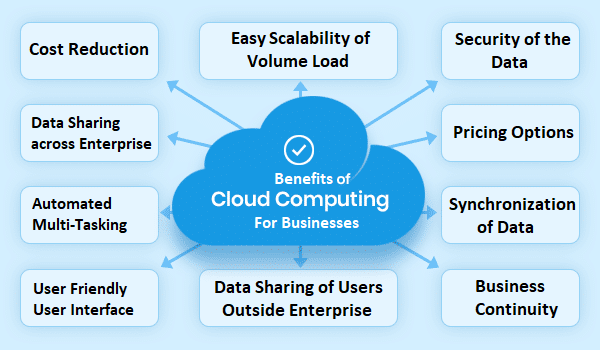
[1] Cost Reduction

To store the data safely, businesses need a Server Room. Setting up a Server Room is costly as it needs space, servers, air conditioning, fire safety equipments, CCTV Cameras, physical access control measures, etc. Disaster Recovery arrangement is also required. The businesses can obviate all these cost and also hassles if the services of Cloud Technology are availed.

[2] Sharing of the Data across the Enterprise

The data can be shared seamlessly on realtime basis by all the users irrespective of the location of the users, time of the access and the device used to access the data. What a great boon in the era of “Work Form Home”.

[3] Sharing of the Data with the Users outside the Enterprise

The data can also be shared in a secured and staggered manner with the users outside the enterprise e.g. customers, suppliers, buyers, investors, etc. This saves lots of time to provide services to customers and plugs the leakages in communication. Online shopping is a good example of availing benefits by this functionality.

[4] Automated Multi-tasking

Local hard-disk or on-site server are fast but when facing multi-tasking by a user or multiple users, they fall short of expectations of users regarding the speed. Given the high capacity of the Cloud for handling automated data flow coupled with speed of the internet, speed satisfies the expectations of multiple users at a time.

[5] User Friendly User Interface

Setting up and maintaining the Cloud services as such are ticklish jobs, even for an IT expert. However, for the user, it is very easy to upload or download the files as the interface is user friendly.

[6] Device Agnostic System

The Cloud works seamlessly with multiple types of devices (PC, laptop, tablet, mobile, etc) at the user end.

[7] Easy Scalability of Volume Load

As the Clouds have massive capacity to handle voluminous data, the CSPs can satisfy the storage need of the client on demand. This convenience cannot be expected if a business has its own data storage facility. As the CSPs have multiple clients, the increase and decrees in the demand stands counter-balanced so their capacity remains optimally utilised benefiting the clients in terms of pricing.

[8] Pricing Options

The CSPs offer various pricing options based on Time Used, Per User, Data Volume and permutations based on these factors (Hybrid Option). These options help the clients to choose the right pricing model and save the cost.

[9] Security of the Data

When connected via internet, safety of data remains the top most concern for the clients and it is more so when the data is uploaded in the servers owned by the third party at a faraway location, mostly unknown to the clients. This concern is well addressed by various physical and digital measures (firewall, encryption, back-ups at other location, etc) by the CSPs. The level of security is higher than what is available at in-house data centre/ server room. As the CSPs are big corporates like Google Cloud, IBM, Amazon, Microsoft Azure, Alibaba etc they can afford large sum for the purpose which individual could not afford. Further, it is not all about money but it is also about having talented manpower in the team.

[10] Business Continuity

Data could be lost due to various reasons like technical failure of the hardware, virus, sabotage, piracy, natural hazards, fire, short-circuit, etc. Business can face tough time to run the shop in a normal way. The chances of such untoward incident will be practically nil in view of the multi-layer security measure deployed by the CSPs. If the businesses avail the Cloud services, it is also a sound alternative to Disaster Recovery measure.

[11] Synchronization of Data

Cloud vendors provide the synchronization functionality. With this feature, user can sync the cloud storage data with other devices, seamlessly.

[12] Standardisation

Though every user of a computer follows standard procedure and dots the  I’s and cuts the T’s, the output/ deliverables are not so standard for variety of reasons. The use of Cloud helps to standardise the input and generate more standardised output/ deliverables.

Disadvantages of the Cloud Technology:

[1] Dependency on Internet

Internet is the mainstay of Cloud Technology. In data technology, the internet has made the geography irrelevant but if the same internet is not available or slow, the user is hamstrung.

[2] Data Security and Privacy

Though the Cloud Services are well equipped to maintain the data security, there are incidents of hacking. Depending upon the law of the land, an authority of a Sovereign Government can compel to divulge the data under given circumstances.

[3] Downtime

If the Cloud service is facing a power outage, a DoS (Denial of Services) attack buy a digital rogue, a technical glitch, a shutdown for maintenance, your own data will not be available till the problem is fixed.

Origin of the name Cloud:

The cloud symbol was used to represent networks of computing equipment in the ARPANET (Advanced Research Project Agency Network, USA) as early as 1977. As such it is a metaphor, having nothing to do with clouds in the sky.

How it works:

Before advent of the Cloud Technology, organisations used to store their data in removable hard-disk or Servers. Servers could be on-site or off-site. The Cloud Service Providers (CSPs) setup the server facility with massive capacity to store the data for the clients. This facility could be at one location or distributed across the globe, close to demand centres.

Future of the Cloud Technology:

The volume at which the data is generated every day is so massive that the adjectives like exponential and astronomical are poor to give the correct picture of the situation. The digital yardstick of Byte (Kilobyte to Yottabyte) is also small to measure the volume. The need and greed for data of businesses are increasing. Data has become a precious commodity in the modern world. Managing and manipulating data for commerce, communication, eGovernance, and entertainment are at the forefront of computing. Under such circumstances a question arises in the mind: What is the future of the Cloud Technology in the world of computing. The answer is: The Cloud Technology is the future of computing. 

If needed any consultation, please do not hesitate to contact us at 8448444245 or info@gujaratinfotech.com for any kind of requirement related  to Cloud Services from Amazon and Microsoft Azure" or Visit - www.gujaratinfotech.com

 =0=0=0=

(The comments of the readers are welcome at gnpatel@gujaratinfotech.com)
Thursday, January 21, 2021

HOW TO PROTECT THE PRIVACY OF YOUR CRUCIAL DATA WHEN ONLINE?

With exponential expansion of internet and mobile telephony, the threat of stalking your screen activities and theft of data of your Personal Identity Information, surfing behaviour, emails, chats, bank account/credit card details, financial transactions, digital wallets, online shopping, etc have become a matter of concern for all. 


Tips to protect your private data:

  • Use strong password. If you are not able to remember the passwords (as we have many now a days) and required to write and hide them, devise your own code for some of the letters, digits and special characters to protect the password so that even if it is found, it cannot be deciphered by any one other person except you. For example, code b = t, m = s, @ = &, 3 = 5, 7=1, etc, etc, etc. Hence, your seemingly looking written password BrMgr@3897 is in fact TrSgr&5891. This code can be used for other vital information of credit card, ATM PIN, etc. There can be a few other such innovative ideas for the purpose. Just remember a few characters in your mind and secure  your password.
  • Do not use popular password like Qwerty@123, Gen@1234, New@1234, etc.
  • Do not use password related to your personal life or the Office Work:  e.g.

-  Personal life: Yoursurname@8675, Yourname&7865, PktY=1998 (Your year of birth), etc.

-  Office Work : HrMgr%4535, AbcLtd+8796, etc.

  • Change the password at regular interval.
  • Change the password/ATM PIN immediately if it has become known to anybody for any reason.
  • Never try to know the crucial private data of other persons, whatever relation you have with the person.
  • Keep the images of your identity documents in secured way.
  • Bank websites should be opened by typing  the website address  (URL) in the address bar and not by clicking on any links in any e-mail or other websites.
  • Restrict the access to your devices by login password / number/ biometrics/ pattern / etc or by keeping, whenever possible, them physically out of the reach of other people. This also applies to other peripherals like pen-drive, removable hard disk, CD, Micro SD Card, etc.
  • Take extra care while using public Wi-Fi / Hotspot / Cybercafe / Shared PC, particularly for financial transaction. Connect via VPN if possible.
  • Do not use your Administrator Account for routine work on computer even though you are the owner / sole user of the system. Create and use usual User Account for routine work on the system.
  • If some person is using your computer very often, create a Guest User account with minimum access to the system.
  • Bear in mind that IoTs used in home and workplaces, particularly IP Cameras are also a source of gleaning data leading to loss of privacy to online data mongers.
  • Keep the use the Social Media limited to remain in touch with near and dear ones rather than flaunting your new acquisitions, emotions, views, wealth, family photos to Public Audience. Besides, reckless posting can land you in embarrassing situation when you are cornered by a person who takes offence, more particularly the State Authority.
  • Give minimum data on social media while creating the account, if it is not for getting a job.
  • Be cautious before sharing your Credit Card number, bank a/c details with anyone.
  • While creating the a/c on social media, study the Settings and Preferences. Select the Settings limiting the tracking your activities and sharing your data, to the extent possible.
  • Do not share your views on sensitive matters. They are a mirror of your personality and preferences.
  • Keep away from the patch of links/pop-up windows / dialogue box like “Paid online surveys”, “People also searched for”, “This might interest you”, “Tricks to win a lottery”, “Health Tips You Must Follow”, “Register for Free Vaccine”,  “This Job suits your CV’, etc, etc. This could  be any and many depending upon the craze in the market and need and greed of the people. There is always a catch in the patch. Another traffic diverter ploy used by the bad boys is “Easy Loan Without Any Security”.
  • Delete the messages/emails offering you Quick Money like the estate of a wealthy man died without any heir, Double your money in short time, Book your order by paying a small amount and get fabulous discount, etc.
  • For net banking / online shopping trust only SECURED websites.
  • The email services come with spam filter but still many spam emails infiltrate the fence and lands in the Inbox. Block such email IDs pestering you with phishing.
  • Do not open the attachment if the sender is not related to you in any way. Unsolicited emails are fraught with risk of virus/malware.
  • Vishing (Voice phishing – fake calls) is also a trap to obtain vital data from the potential victims. Do not get scared if you receive a threatening call to block your Credit Card, Bank a/c or other services. Such callers are good communication artist and trick you to share the data. Just cut the call and contact the Service Provider and report the call. Save the number as CARE FAKE. Caller ID app can be useful to some extent to ascertain the identity of the caller. Discuss the incident with your family members and friends.
  • Do not share the OTP received on your mobile/email when the process is initiated by you or even when process is not initiated by you. A conman could seek OTP on your mobile and trick you to share it with him and robe your money.
  •  Do  not seek help to set/reset the password, ATM PIN, etc. If you are novice, learn from reliable sources to do the task yourself.
  • Do not handover your ATM card / Credit Card / Debit Card to ANYBODY. Such handover might absolve the issuer / bank from any liability of misuse.
  • Do not accept friendship with unknown person of opposite gender. In long run, this may lead to embarrassing situation, including blackmailing.
  • Update your system / app from time to time as most of the updations provide stronger security features.
  • Be selective in subscribing email Alerts and Newsletters. These apparent innocuous offers might have an ulterior motive.
  • Log out of the website in a systematic way rather than just clicking on X on right hand top corner.
  • Easier said than done but read the privacy policy of the website when you are required to share crucial personal information. If the policy is weak, share bare minimum data as goodness knows where your data would land.
  • Use Auto  Log Off / Screen Saver after defined period of inactivity on the system.
  • When the access to the system is given to an expert for fixing a glitch or for any other reason, keep your watchful eyes on your screen and keep track of what the  expert is doing with the system.

Feel concerned?

If yes, you have, for having read this blog, invested your time meaningfully. Whatever private policy the communication platforms have, you must have your own Policy when online : Be careful (nearly a  skeptic) and tread cautiously. If you do not act responsibly, sorry to say, you cannot hold other people or the system responsible for the loss you suffer. Moreover, acquire basic knowledge of all these platforms to understand their intricacy. Though the risk is there, life is difficult for a modern man to live without internet, mobile and Social Media. You are the most important person to prevent the erosion of the privacy of your crucial data.

   Though we know about the lurking dangers of this theft when we bask in the maze of Social Media, internet and mobile telephony, it is difficult for a modern man to live without them. Despite tall claims of the robustness of the system by the vendor, there are incidents the system is breached in by the hackers. They are more dangerous than a pickpocket as they can penetrate the firewall of computer algorithm and architecture, while hiding away in a swanky office in a city or a dusty village like Jamtara or a small hamlet in Nigeria. At times, the employees and ex-employees are exploited to hack the system. The personal vital data has become a vital commodity traded for profit in I T world. General perception in the mind of a common man about vital data is confined to Login ID, Sign-on Password, Transaction Password, ATM PIN, Credit Card Number, its C V V, etc. It is not so. 

      The hackers are datamining the social media for your mobile number, contacts, location, preferences, I D Proofs, Bank a/c details, Passport and Visa details, etc. They sell the softcopy of the data to their allies down the line in the racket for hard cash. The attack on your vital data can be covert or overt taking benefit of man’s innate succeptibity to weaknesses : Greed, carelessness, attraction to opposite gender, prey to emotional appeals, blind trust, impatience and the latest one just “Click OK, OK, OK and SUBMIT”, etc. At times,  their modus operandi is so subtle that it does not let you feel the sting.

It cannot be gainsaid that netizens were oblivious of the inherent risk of theft of Personal Identity Information and online cheating while communicating or dealing through electronic media. Now the anxiety is only heightened as the issue is brought to limelight by the proposed changes in the Privacy Policy of a major player  in Social Media, if the user clicks AGREE. Without dwelling much on these recent developments and turbulence it has created, the present blog attempts to discuss the issue and tips on HOW TO PROTECT THE PRIVACY OF DATA while using social media, internet or mobile by a common man with basic computer literacy (as the issues and tips for the businesses would be a different ball game). We should accept that the risk is real and has become greater than ever with the advent of Social Media in all spheres of life. Secondly, we should think about the motives of the service providers behind the free services. At times, the providers of such services themselves might not be targeting the users but the external perpetrators of the fraud intercept your data. Data encryption of the content provides some protection to users but still there is a risk to your meta data (your personal information and your Behaviour/ preferences as a media user). Technology provides many smart ways of keeping your screen under surveillance without giving any clue to you.   

            Let us also accept that the use of social media  has become more of an addiction than necessity across the society. We enjoy all sorts of FREE functionalities offered by them every moment and erode our privacy. As a tradeoff, we allow (rather, have to if you want to avail wide array of services) all accesses to our location, photos, camera, documents, contacts, emails, etc. At times wider access is also for good reasons   for the apps / social media to serve you better e.g. a taxi app needs your location to pick you up. Reputed social media might not fleece you by swindling your money but they still have a motive in collecting your data for furthering their interests and strengthening their clout. Artificial Intelligence and Analytics can draw commercially, politically and socially valuable inferences from the stockpile of data harvested online. Now a days, most of the devices (PC, laptop, mobile phone, tab, etc) have  most of the  functionalities and data are shared/synced and same devices are used for just killing the time for fun and also for office work, which make your data more vulnerable. The task of intruder becomes easy if you have, while crating the account, granted the access permissions liberally which we perfunctorily do without availing the functionalities of various restrictions and preferences provided in the Settings. It is not the lack of knowledge but behaviour makes the gullible users sitting ducks.

Get more tips on data security on  www.gujaratinfotech.com

                    (The readers’ comments are welcome at gnpatel@gujaratinfotech.com)